
Quick start
An instrument you play by walking: touch the sheet, cross a contour line, set the pitch on the ribbon.
Most synthesizers ask you to build a sound one parameter at a time. Contour gives you a landscape instead. Four distinct neural instruments occupy the corners of each sheet; every point between them is a continuous blend.
The first time you open Contour, a short intro runs on the sheet itself, one line at a time. It ends when you have done all three things below, or when you tap SKIP INTRO. To see it again, open Settings (the three short lines at the top right) and choose SHOW INTRO.
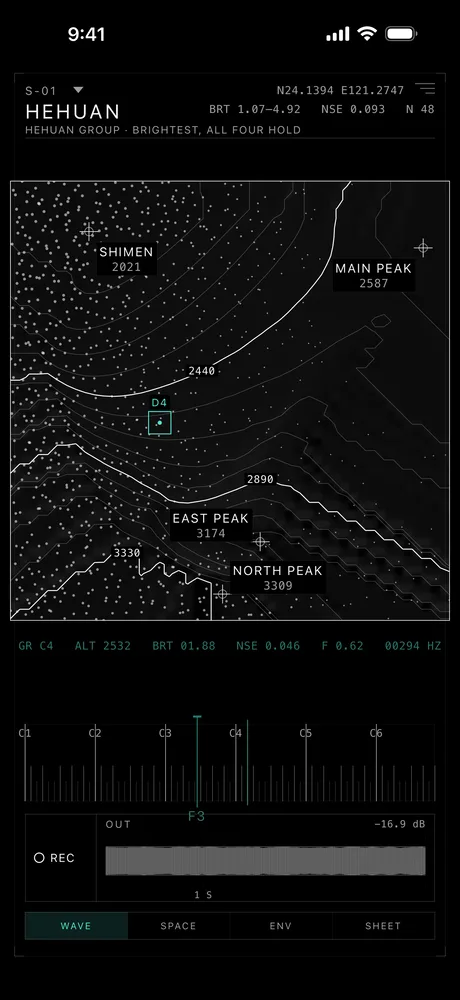
Sheet
S-01, the first sheet.
Peaks
Each corner is a named peak and its height.
Finger
The cyan square is your finger: D4.
Readout
Live values in fixed-width columns.
Pitch ribbon
Out
The output scope.
Tabs
Wave, Space, Env, Sheet.
Touch the map to sound a note. Move your finger to travel through timbre.
- Touch becomes timbre. Your X–Y position continuously blends all four corner instruments.
- Pressure becomes dynamics. A wider contact opens the sound without adding another control.
The contour lines are not decoration. Every line is generated from the sound the four decoders actually produce. Cross a contour and the timbre has changed by a known amount.
How the lines are measured is in How it works.
The ribbon beneath the terrain controls pitch. You can also send MIDI and play it from a keyboard.
Each sheet has its own pitch range, set by what its four corners were actually trained on. The ribbon shows that range rather than a fixed keyboard. More in Known limits.
Hold a location to leave a mark and return to it later. Drop marks on useful locations and build a personal map of sound.
Tap a mark to hear that spot again. Hold an existing mark to delete it.
Related
Still stuck? Write to zhi@nonoaudio.com. Support page