

Welcome to GranSample
What GranSample is, how the app is laid out, and the fastest path from a blank project to your first sound.
GranSample is an MPC-style sampler with a granular engine under every pad. You tap pads to play samples, sculpt them into evolving textures, and sequence patterns — all on iPhone and iPad, running either as a standalone app or as an AUv3 plugin inside hosts like GarageBand, Logic, AUM, Drambo, and Loopy Pro. It requires iOS 16 or later.
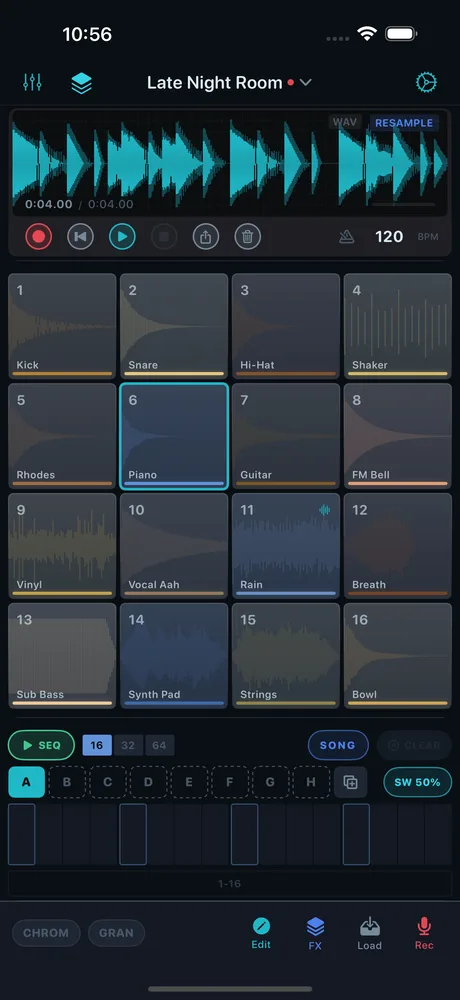
The home screen is a single 4×4 grid — 16 pads — plus the surfaces that surround it. From top to bottom you get the recorder bar, the pad grid, the step sequencer, and a per-pad toolbar, with a navigation bar across the top.
The top bar holds the buttons that take you between the app's main areas:
- The project name sits in the center. Tap it to open the Library, where the factory Kits and your saved Projects live.
- On the left, the Mixer button (sliders icon) opens the Mixer, and the Master FX button (stacked-squares icon) opens the master effects chain.
- On the right, the gear button opens Settings.
Each pad plays one sample. Tap a pad to select it; how you tap sets the velocity. The grid is also where Chromatic Mode turns the pads into a playable keyboard. See The Pad Grid for the full rundown.
In the free tier, pads 1–8 are unlocked with the complete granular engine, effects, sequencer, mixer, and MIDI. Pads 9–16 show a lock icon and require GranSample Pro.
The recorder bar carries transport, tempo (BPM), and the metronome. The step sequencer is always visible below the grid and edits the selected pad's pattern. The per-pad toolbar at the bottom holds the CHROM and GRAN toggles plus Edit, FX, Load, and Rec actions for the selected pad.
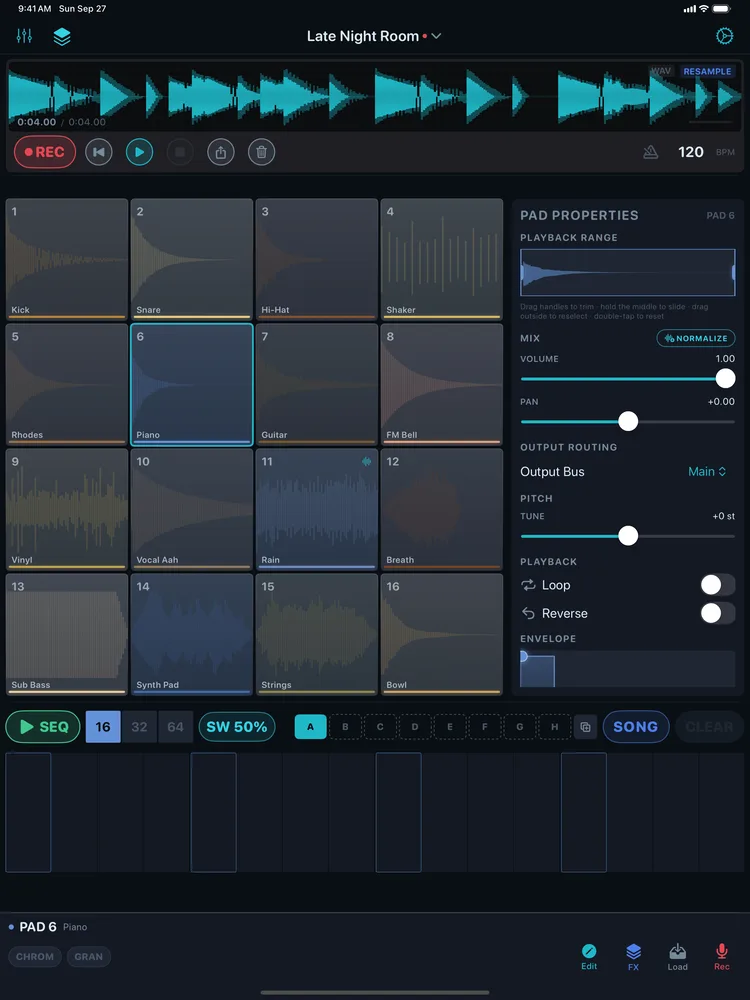
On iPhone the four zones stack vertically in one column. On iPad you get more room: in portrait, the pad grid sits on the left with a Pad Properties panel on the right. In landscape, the recorder bar, properties panel, and pad toolbar move into a dedicated right column beside a larger pad grid, so nothing has to stack.
You have two quick paths to a pad that makes noise:
- Load a Kit. Tap the project name to open the Library and pick one of the factory Kits — every pad arrives wired with a sample and granular settings. See First Launch & Factory Kits.
- Record onto a pad. Select an empty pad, tap Rec in the bottom toolbar, and capture up to 60 seconds from the mic with a live waveform. See Recording from the Mic.
Either way, tap a pad to hear it. To turn a pattern into a loop, paint steps in the step sequencer and hit play.
Right after you pick a starter Kit, GranSample walks you around the main screen in 13 short stops. The tour shows you what each part is and where it sits. Here are the same stops in the same order, each with the chapter that explains how it works and why.
To take the tour again, open Settings → Help → Replay App Tour.
Tap to Play. How velocity works, and how to rename and colour a pad: The Pad Grid.
Pad Tools. What
Edit,FX,LoadandRecdo for the selected pad: The Sample Editor, Importing Audio and Recording from the Mic.Granular Synthesis. What each grain control does: Granular Parameters and The Granular Envelope.
Chromatic Mode. The root note, the pad labels, and playing it over MIDI: Chromatic Mode.
Edit & Chop. Trimming, looping and the mode tabs: The Sample Editor. Slicing across pads: Chopping a Sample. Routing
LFOandENV: The Modulation Matrix.Step Sequencer. Painting steps, velocity, length and paging: The Step Sequencer.
SWINGarrived in 1.5: Swing.Pattern Bank. Bar-quantized switching and
DUP: The pattern bank.Song Mode. Building, repeating and reordering the chain: Song Mode.
Mixer. Mute and solo rules, metering and output routing: The Mixer.
Master FX. Adding, reordering and saving presets: The Effects Chain. Every parameter: Effects Reference.
Record Sessions. Recording, reviewing and exporting a take: Exporting Audio.
RESAMPLEarrived in 1.5: Resample Your Beat.Make It Yours. Wallpapers, your own photo, dim and pad opacity: Custom Backgrounds.
Browse Library. Factory Kits, and saving one as your own project: Library & Projects.
- New to granular synthesis? Start with What is granular synthesis?
- Bring in your own audio with Importing Audio or trim it in the Sample Editor.
- Slice a loop across the pads with Chopping a Sample (Pro).
- Add movement with the Modulation Matrix (Pro) and its LFO.
- Running it in a DAW? See GranSample as an AUv3 Plugin.
Still stuck? Write to zhi@nonoaudio.com. Support page