
What's new
What changed in each GranSample release, newest first.
Steadier audio.
- Fixed sound cutting out for a moment during playback when pads were routed to a group bus, muted or very quiet.
- Turning effects on and off while playing — master effects included — no longer leaves a short gap in the sound.
- Switching effect presets and editing effect chains during playback is smoother, and a pad no longer goes silent after quick back-to-back effect edits.
- The What's New screen no longer reappears after small updates.
Groove you can feel, hi-hats that behave, and a way to turn your beat back into raw material.
Drag SWING next to the pattern strip and every second 16th slides late — from dead straight at 50% to a heavy shuffle at 75%. Downbeats stay on the grid. Double-tap to go straight again. In the plugin it swings in time with your host.
Put your open and closed hats in the same group and each hit cuts the other off, the way a real kit does. Pick Off or 1–8 in Pad Properties. It works from the sequencer, MIDI and your fingers, and saves with the project.
Tap RESAMPLE on the recorder and record GranSample's own output back onto a pad. With the sequencer playing it waits for the next bar and captures exactly 1, 2, 4 or 8 bars as a seamless loop — ready to chop, pitch or turn granular. Part of GranSample Pro.
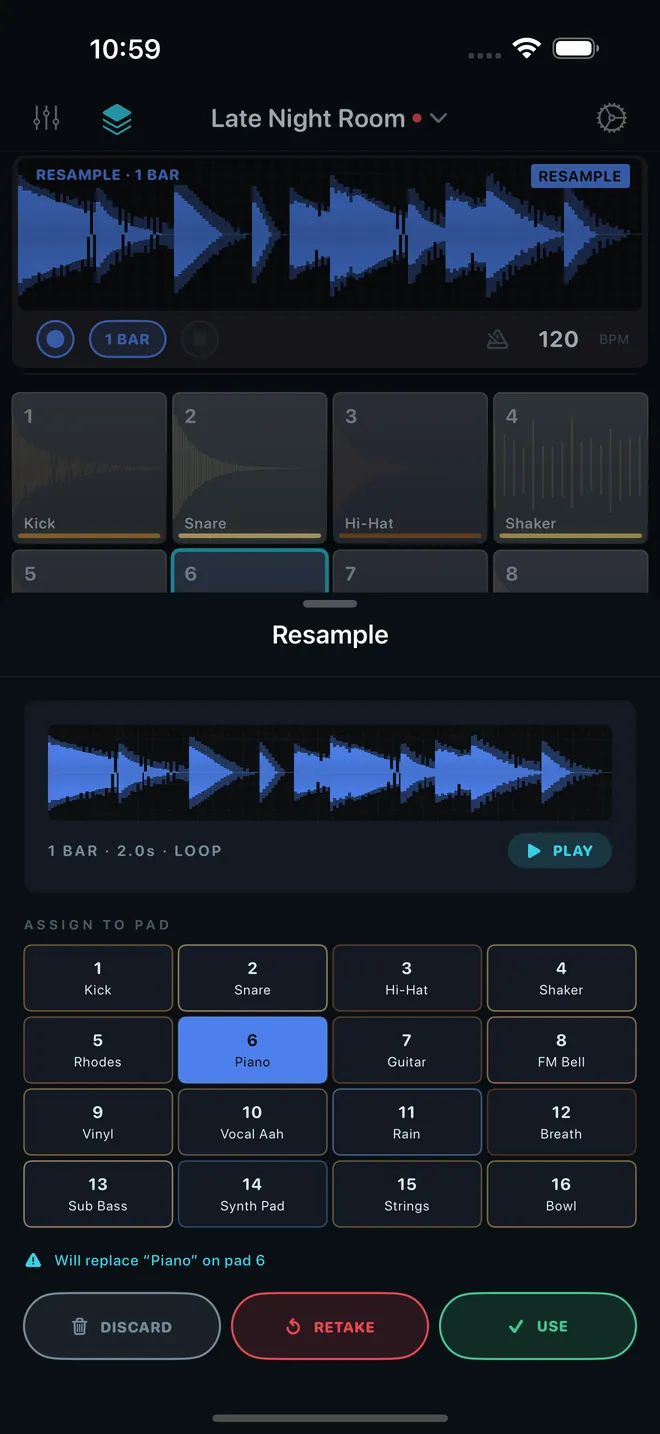
On iPhone the recorder display is now more than twice as tall, and the waveform is drawn from scratch: every hit shows its real attack and body, quiet parts stay visible, and clipping is marked in red. The pad panel below is slimmer, and switching the sequencer between 16, 32 and 64 steps no longer shifts the screen.
The AUv3 plugin now has Sound, Grain and Sequence tabs. The full granular controls and LFO / envelope modulation (Pro) sit right inside your host, patterns run 16, 32 or 64 steps, and you can type exact values. It follows the app's look and scales for iPad and Mac.
More on the plugin: GranSample as an AUv3 Plugin.
Related
- The Step SequencerPer-pad step patterns with per-step velocity, drag-to-paint, and host sync.
- Exporting AudioBounce your full mix to an audio file. A GranSample Pro feature.
- GranSample as an AUv3 PluginRun GranSample inside GarageBand, Logic, AUM, and other hosts with host transport, MIDI, and automation.
Still stuck? Write to zhi@nonoaudio.com. Support page