
Quick start
Type a word, make it talk, pick a voice. The same four steps as the tour in the app.

The first time you open SpellSynth, a short tour walks you through it on the real keypad. These are the same four steps. To see the tour again, open Settings (⚙) and tap REPLAY TUTORIAL.
Type a short word. Use the keypad, or tap
TYPEto use your keyboard.Now make it talk. Tap
▶ SAYto hear it spoken aloud.Same word, different year. Open Settings (⚙) and pick a vintage voice under
VOICE CHARACTER. In the tour, each voice previews the word you just typed.Four ways to play. Switch modes from the bar at the bottom. The five modes are below.
SpellSynth looks like a pocket spelling toy. The green VFD display at the top shows what you type and what it's saying. Below it is the A–Z keypad with a ⟵ delete key and (in Free Play) a SPACE key. The MODE bar switches between the five modes, and the gear (⚙) opens Settings, where you choose your voice and its language, and replay the tutorial. A RECENT row remembers what you've played this session — tap a chip to hear it again.
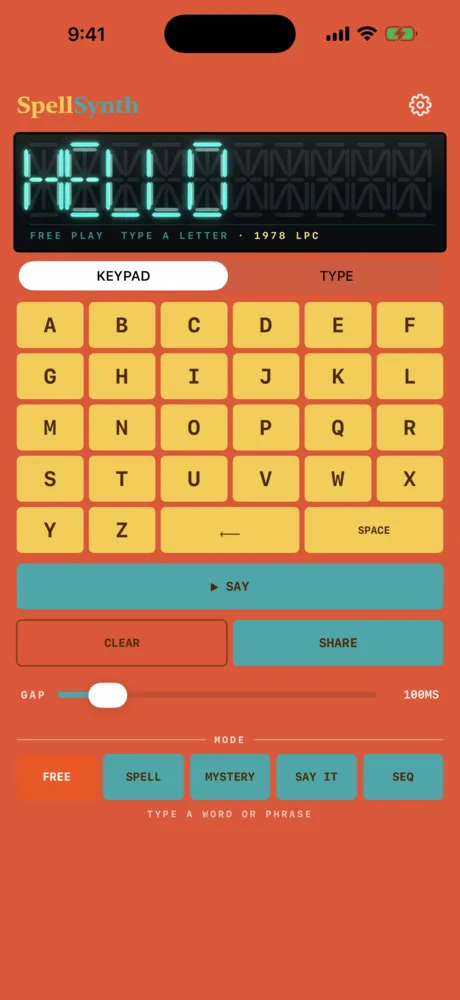
Display
Lit letters glow over ghost segments.
Keypad or type
Keys
A to Z, delete and space.
Say
Gap
Shown at 100 ms.
Modes
Free, Spell, Mystery, Say It, Seq.
FREE- Type a word or whole phrase — hear it, SHARE it. Free Play
SPELL- Hear a word, then type its letters. Spell
MYSTERY- Guess letters before you run out of tries. Mystery Word
SAY IT- Listen and repeat, like a coach. Say It
SEQ- Sequence words on a beat. SEQ
Connect a USB, Bluetooth or Network MIDI keyboard and SpellSynth speaks letters from real keys: MIDI notes 60–85 (C4–C#6) play A–Z. For words, pitch bend and the rest of MIDI, use the AUv3 instrument in a host.
Related
- Free PlayType anything and hear it spoken back: words, whole phrases and numbers.
- The four voicesSame word, different year: three vintage voice characters and a clean Default, in English or French.
- Spell · Mystery · Say ItThree word games: spell the word you hear, find the hidden word, listen and repeat.
Still stuck? Write to zhi@nonoaudio.com. Support page