
SEQ: the word step sequencer
Sixteen steps, each holding a word that speaks in your chosen voice. Type four words, get a robot vocal loop.
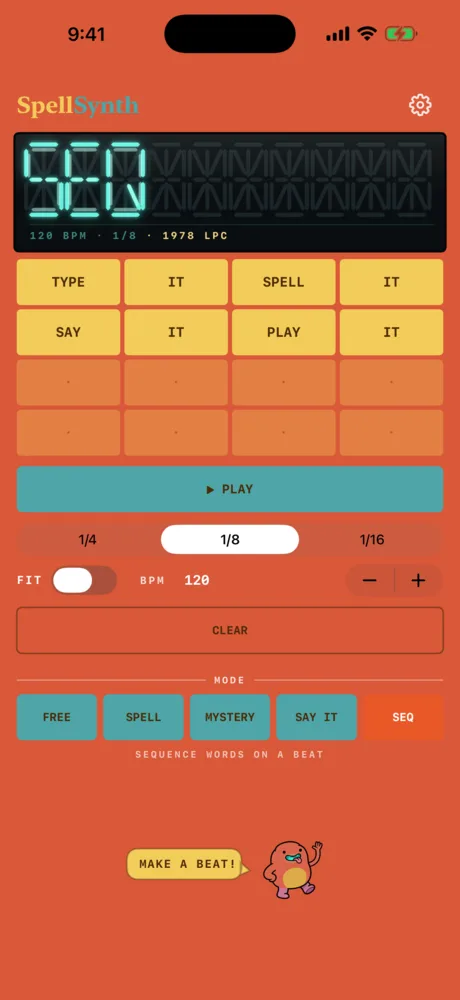
SEQ turns SpellSynth into an instrument you can play in time. Sixteen steps, each holding a word that speaks in your chosen voice.
Tap a step and type what it should say, then tap DONE. Two or more letters is a word. A single letter is treated as a letter and uses the recorded alphabet voice — so you can spell a word out across several steps and then say it whole on the next one. Leave a step empty for a rest.
Tap ▶ PLAY. The display shows each word as it fires and the grid highlights the step you're on. CLEAR empties the grid.
BPM runs from 40 to 240. Steps land on 1/4, 1/8 or 1/16 notes. FIT stretches each word to exactly fill its step — with it on, words speed up and pitch up as you push the tempo, the way a sampler does. With it off, each word plays at its natural speed and the next step cuts it off.
In the app, any word. A SEQ step plays from the 500+ word library when the word is in it, and falls back to on-device speech when it isn't — exactly like Free Play. A step holding a single letter always uses the recorded A–Z bank.
The AUv3 has the same sequencer, following your host's tempo and transport instead of the built-in clock. There, Seq Steps sets the loop to any length from 1 to 16 steps. Two factory presets show both halves of the idea: Robot Chant puts a word on every step, Spelling Bee spells a word out and then says it. A step in the plug-in plays a library word or one that has already been rendered, whether by the app or by typing it into the plug-in once; a word it cannot find shows a ⚠ badge on that step rather than failing silently. More in the AUv3 chapter.
Related
- The AUv3 instrumentThe same voice engine inside any Audio Unit host on iPhone & iPad, with MIDI, presets and the step sequencer.
- Free PlayType anything and hear it spoken back: words, whole phrases and numbers.
- The four voicesSame word, different year: three vintage voice characters and a clean Default, in English or French.
Still stuck? Write to zhi@nonoaudio.com. Support page