
Free Play
Type anything and hear it spoken back: words, whole phrases and numbers.
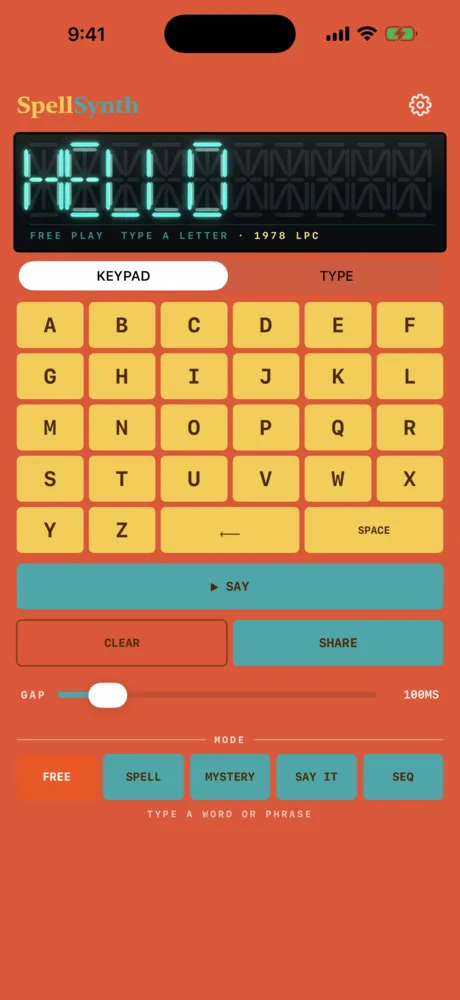
Free Play is the heart of SpellSynth: type anything and hear it spoken back. It handles single words and whole phrases.
Use the on-screen keypad, or tap TYPE to switch to your device keyboard (handy for punctuation or longer text). KEYPAD switches back. Tap SPACE between words to build a phrase.
Tap ▶ SAY. A single word plays straight through; a phrase is read word-by-word, and the display cycles to each word as it plays.
Numbers are spoken as words — "I have 2 cats" says "two". Contractions are kept intact, so "don't" and "we'll" sound right instead of being spelled out.
The GAP slider tunes the pause between words from 50 to 500 ms. It starts at 100 ms each time you open the app. SHARE renders the current word or phrase to a 16-bit / 24 kHz mono WAV you can save or drop into a DAW. Everything you play lands in the RECENT row for one-tap replay.
Anything beyond the 500+ bundled words falls back to on-device speech, so every word speaks. It goes through your chosen voice and is cached, so the second tap is instant. See the four voices and the word library.
▶ SAY.Related
- The four voicesSame word, different year: three vintage voice characters and a clean Default, in English or French.
- SEQ: the word step sequencerSixteen steps, each holding a word that speaks in your chosen voice. Type four words, get a robot vocal loop.
- TroubleshootingNo sound, a word that comes out spelled, the AUv3 and how to report a bug.
Still stuck? Write to zhi@nonoaudio.com. Support page