
Your first tune
PocketTone is a tiny retro synth with a green LCD, ten rhythms and a calculator. Tap a key and it plays.
PocketTone opens ready to play: the Piano voice, the middle octave, 120 BPM and the March rhythm. On iPhone it plays in landscape; on iPad any way round. Here is the short path from opening it to something with a beat under it.
Tap a key. The keyboard is monophonic, like the little synths it is modelled on: one note at a time, and the newest key wins. Slide a finger across the keys for a glissando.
Press
RHYTHM. March starts. Change it with the red ◀ ▶ beside its name on the LCD; the rhythm switches live, and the melody keeps playing over it.Set the mix.
VOLUMEis the master level.BALANCEcrossfades the rhythm (RHY) against the melody (MEL); in the middle both are at full level.Change the voice. Slide
TONEalongVIOLINFANTPIANOFLUTEGTRADSR. Piano and Flute are free; the others are part of PocketTone Pro.Flip
POWERtoCAL. Now it is a calculator, and every digit you type is a note. Press=for the answer, and everything you typed plays back as a melody. See The calculator.
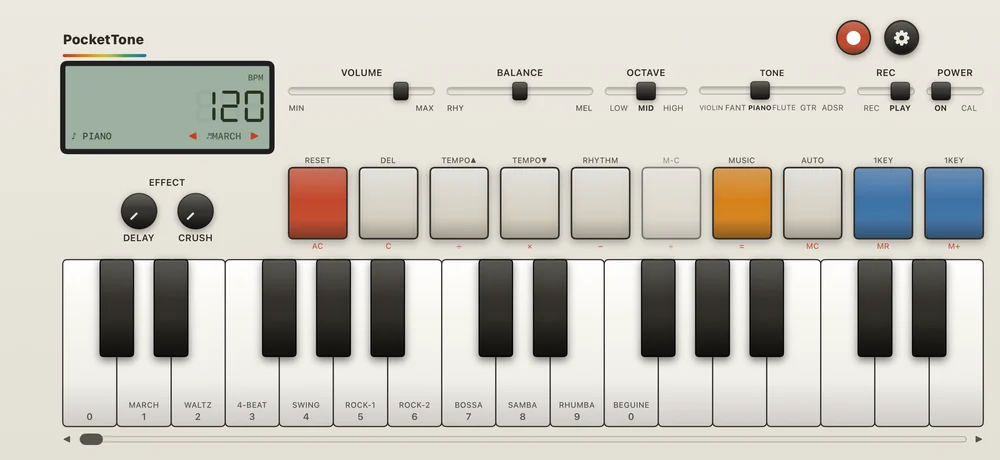
LCD
Tempo in seven-segment digits, the voice, and ◀ ▶ to change the rhythm.
Tone
Violin, Fantasy, Piano, Flute, Guitar and ADSR.
Power
ON plays the synth. CAL turns it into a calculator.
Record and Settings
Effect
Delay and Crush.
Function keys
The music job is printed on top, the calculator job in red below.
Keys
Rhythm names and calculator digits on the white keys.
Keyboard window
Slide it to reach the rest of the three octaves.
PocketTone remembers the panel when you leave the app: voice, octave, tempo, rhythm, volume, balance, the effects, the ADSR code and the tune in the melody memory. A free launch puts a Pro voice or rhythm back to Piano or March.
Every switch and key is explained in The panel.
Related
- The panelSix faders and switches, ten function keys with two jobs each, and an LCD that tells you what is going on.
- Keys and octavesThree octaves of keys, one note at a time, seventeen white keys on screen and a slider for the rest.
- The calculatorFlip POWER to CAL and PocketTone does sums. Every digit you type is a note, and = plays them back.
Still stuck? Write to zhi@nonoaudio.com. Support page