
The calculator
Flip POWER to CAL and PocketTone does sums. Every digit you type is a note, and = plays them back.
The pocket-toy party trick. Slide POWER to CAL: the LCD becomes a calculator display, CAL appears beside the voice name, and the instrument switches to a calculator's buzzy beep.
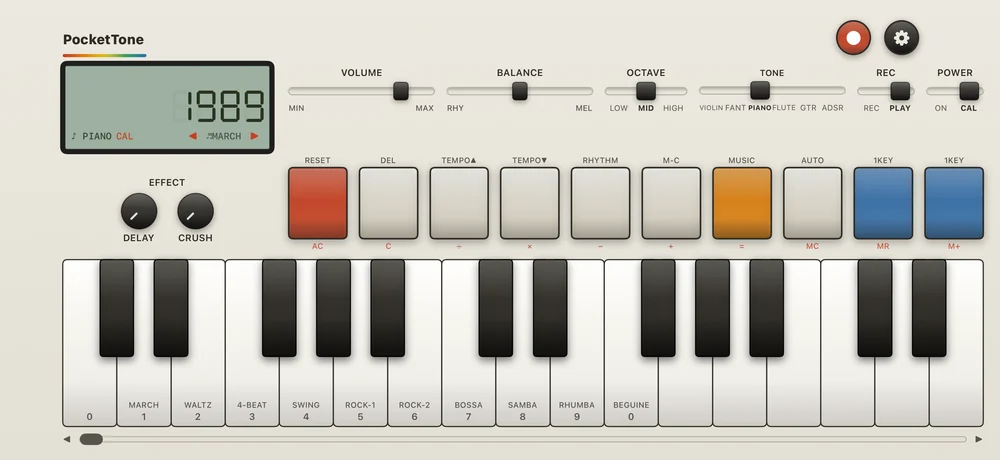
Type a number on the white keys marked 0 to 9. Each digit sounds a note as you press it: 0 is middle C and each digit is a semitone higher, whatever
OCTAVEsays.Press an operator:
÷×−+. It adds a short rest to your tune.Type the next number, and so on.
Press
=. The answer appears, and everything you typed plays back once as a melody, rests and all, at the current tempo.
It works like a real pocket calculator: eight digits, one memory, and each operation runs as you go, with no order of operations, so 2 + 3 × 4 = gives 20. Dividing by zero, or an answer of nine digits or more, shows ERR; press AC to start again.
| Key | In CAL |
|---|---|
AC | Clears the sum and the notes you typed, and stops playback. The memory stays; MC clears it. |
C | Clears the number on the display. The notes you typed stay. |
MC | Clears the memory. |
MR | Shows the memory. |
M+ | Adds the display to the memory. With TONE on ADSR it also stores the voice's code: see The ADSR voice. |
A tune holds up to 100 notes. Only a press counts: sliding along the keys does not type, and only the keys with digits make a sound. Flipping POWER back to ON stops the playback, clears the typed tune and brings your voice back.
Related
- The ADSR voiceProgram your own voice the way the original did: an eight-digit code typed on the calculator keys.
- The panelSix faders and switches, ten function keys with two jobs each, and an LCD that tells you what is going on.
- Keys and octavesThree octaves of keys, one note at a time, seventeen white keys on screen and a slider for the rest.
Still stuck? Write to zhi@nonoaudio.com. Support page