
Your first loop
Matcha is meant to be picked up, not studied. A pack, some chords, a loop, a video. No theory needed.
Here is the whole thing in a few minutes. The short path from opening the app to something you can share:
Choose a pack — a mood to play in. Tokyo Rain is an easy place to start.
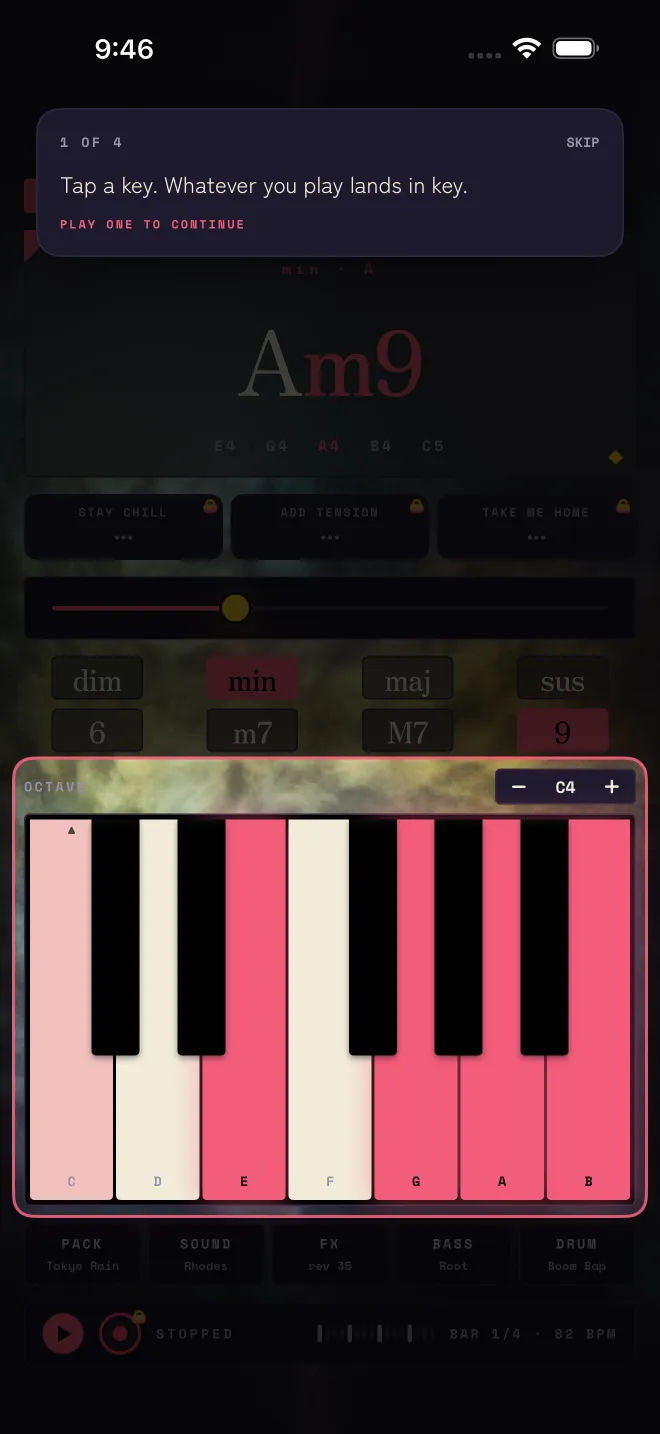
Tap a key. Whatever you play lands in key: the keyboard picks the root, and Matcha picks a chord colour that sits in the pack's key.
Shape the chord. Drag the slider to open it up, and tap the buttons above the keys for minor, major, 7ths and 9ths.
Press play. Drums and bass come in and loop four bars, and you play the chords over them.
Jam over the loop. When you want to keep or arrange what you played, that is Studio.
That is the entire loop. Everything after this page is just the same few moves, in more detail.
The app also walks you through this on the real screen the first time you open it — four short pointers at the keyboard, the chord controls and the two Studio features. You can re-run it any time from Settings with Show the intro again.
The pointers say where things are. Here is what each one is for.
- 1 · Keys
- "Tap a key. Whatever you play lands in key." The first pointer waits until you play something. Why every key sounds right: Play by feel.
- 2 · Shape
- "Drag to open the chord up. Tap for minor, major, 7ths and 9ths." The slider and the chord buttons are one idea: shaping the chord you just played. See Play by feel.
- 3 · Journey
- "Stuck? These three say where the chord wants to go next." The row under the chord card. Part of Studio: Chord Journey.
- 4 · Magic
- "Four bars become a whole song here. Listening is free." The wand at the top. Part of Studio: Matcha Magic.
Related
- Pick a moodA pack is a complete kit: synth, bass, drums, swing, tempo, chord palette and colour.
- Play by feelThe keyboard sets the root, the buttons set the type and the colour, and the slider sets the voicing.
- Matcha StudioOne purchase, no subscription, no account. The half of Matcha that keeps what you play.
Still stuck? Write to zhi@nonoaudio.com. Support page