
Play by feel
The keyboard sets the root, the buttons set the type and the colour, and the slider sets the voicing.
Every chord is three small choices working together:
- The keyboard sets the root. Press A, and you are playing an A chord.
- The top row sets the type —
dimminmajsus. - The bottom row adds a colour —
6m7M79.
So A with min and m7 gives you Am7. Change any of the three and the chord updates as it plays. Voice-leading is built in, so moving from one chord to the next stays smooth on its own.
When you press a key, Matcha picks the type and colour for you, so the chord sits in the pack's key. The buttons still recolour any chord after you play it, and that choice holds until you press the next key.
The slider above the buttons is the voicing — drag it to open the chord up or draw it in tighter. The notes stay the same; what changes is which one sits at the bottom, and that is what smooths a change from one chord to the next.
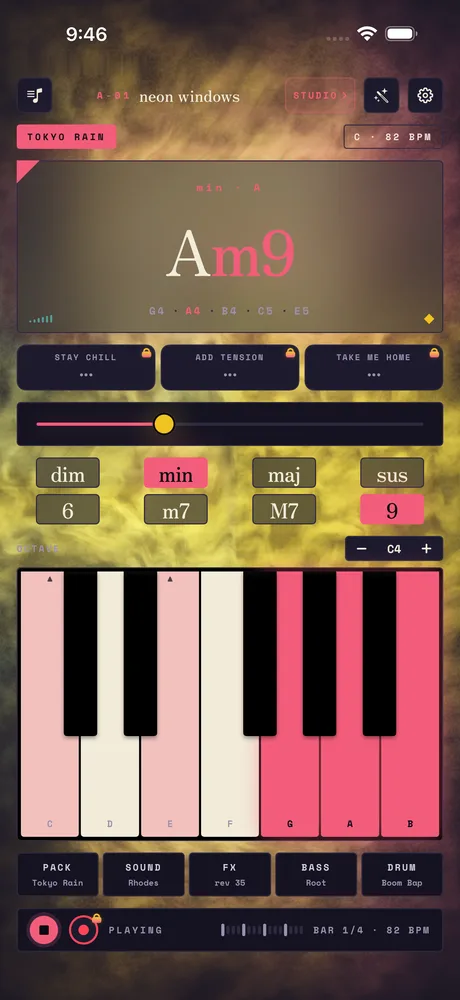
Chord
The chord on stage: Am9.
Chord colour
dim, min, maj, sus, 6, m7, M7, 9.
Keys
The piano. Lit keys glow coral.
dim- Diminished: tense, restless — wants to resolve.
min- Minor: lowered 3rd — moody, introspective.
maj- Major: natural 3rd — bright, stable.
sus- Suspended: 3rd swapped for 4th — hovering, unresolved.
6- Add 6th: vintage swing — bossa, doo-wop, golden-era pop.
m7- Minor 7th: soft tension — soul, R&B, jazz.
M7- Major 7th: dreamy, floating — city pop, lofi.
9- Add 9th: lush, modern — neo-soul, fusion.
The app shows these as small hints when you tap the buttons.
Related
Still stuck? Write to zhi@nonoaudio.com. Support page