
The keyboard leads
Choose the root, see what is sounding, and set how warm or bright a chord sits.
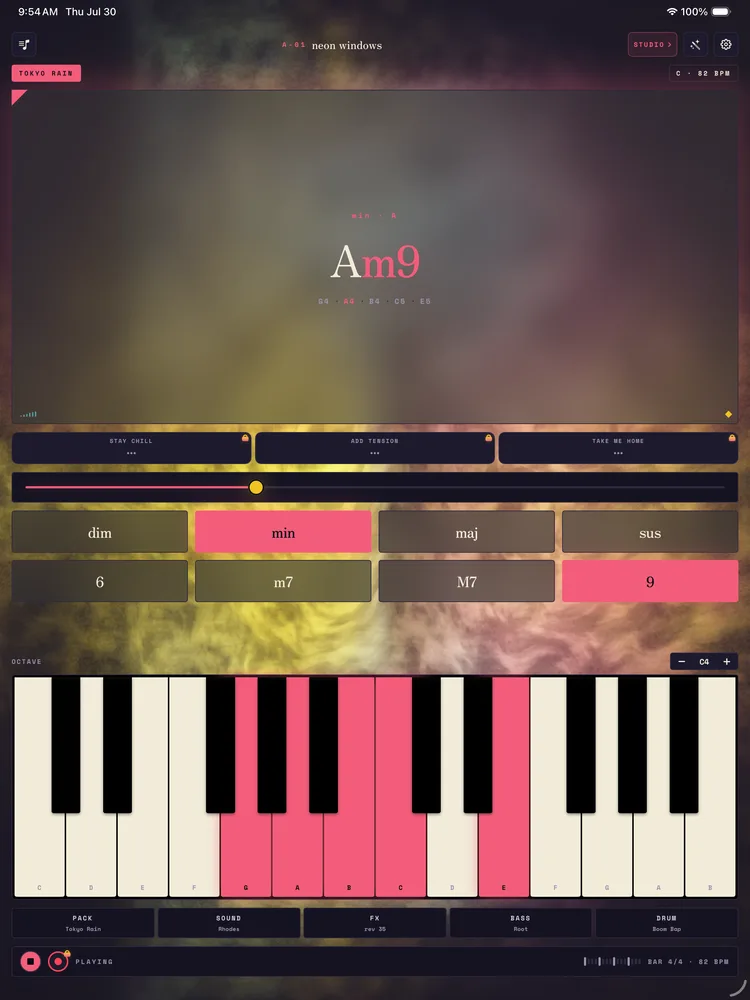
One octave, C to B, on iPhone. On iPad you get two octaves, and three with the iPad turned sideways. As a chord sounds, its notes light up, so you can always see what you are playing.
The keyboard also sets the register: low for a warm, rounded voicing, high for a brighter one. Use − and + on the OCTAVE bar above the keys to slide the keyboard down or up, from C3 to C5. It is a feel control as much as a way to choose the root — the same chord can sit deep or float, depending on where you touch.
The chip at the top right shows the key and tempo, for example C · 82 BPM. Tap it to pick one of the twelve keys, set the tempo anywhere from 40 to 200 BPM, or tap TAP in time to set it by feel. Each pack starts in its own key and tempo.
Related
Still stuck? Write to zhi@nonoaudio.com. Support page