
Your library
Every song in one list: search by title, composer or chords, sort it, star your favourites.
The library is every song you have, charts and PDFs together. Tap one to open its page: the chart's preview, its style, key and tempo, and Play and Edit.
The search field at the top looks through titles, composers and chords. Type Dm7 G7 to find the songs that use both. It reads chord symbols the way Leganote writes them on the chart, so capitals count and C#m7 is one word. Write flats with b, a major seventh as Bbmaj7 (not BbM7), a minor seventh as Bbm7 and a half-diminished chord as F#m7b5. That goes for titles too: search matches whole words, capitals included, so type Greensleeves rather than green.
Above the list, All Songs switches to Favorites or PDFs, and the sort menu next to it orders the list by Title, Composer, Recently Added, Recently Updated, Tempo or Key. Pull down on the list to refresh it.
Tap the star on a row, or swipe it to the right, to make it a favourite. Swipe left and tap Delete to remove a song. Deleting takes the song out of your iCloud Drive, so it goes from your other devices too.
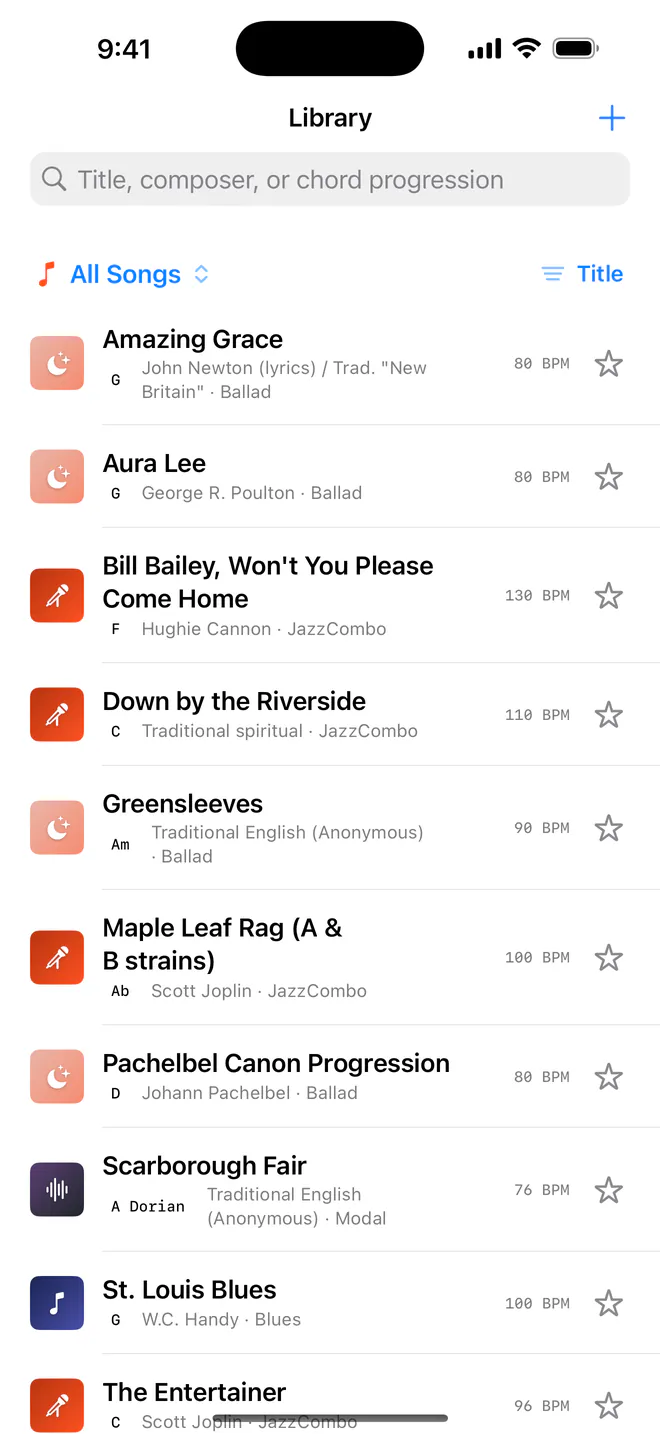
Leganote comes with 13 public-domain charts to play straight away: Amazing Grace, Aura Lee, Bill Bailey, Down by the Riverside, Greensleeves, Maple Leaf Rag, the Pachelbel Canon progression, Scarborough Fair, St. Louis Blues, The Entertainer, Tico-Tico no Fubá, a twelve-bar blues in F, and When the Saints Go Marching In.
In the free version, Amazing Grace, When the Saints Go Marching In and Maple Leaf Rag are yours to open, and the others wait at the bottom of the list until you unlock Pro. On the Mac, and with Pro, they all open.
Without Pro, the library holds three songs you can open, and the starter songs you can open count toward them. A small bar above the list shows where you are. The three free starter songs already fill it, so it starts at 3/3 free songs: to make room for a song of your own, delete one. Pro removes the limit: see Free and Pro.
Related
- Import and exportBring charts in from ChordPro, MusicXML or PDF, and send them out as PDF or MusicXML.
- iCloud and your filesYour songs are files in your own iCloud Drive. Apple syncs them; there's no Leganote server and no account.
- Free and ProWhat's free, what the one-time Pro unlock adds on iPhone and iPad, and how the Mac app fits in.
Still stuck? Write to zhi@nonoaudio.com. Support page