
Play along
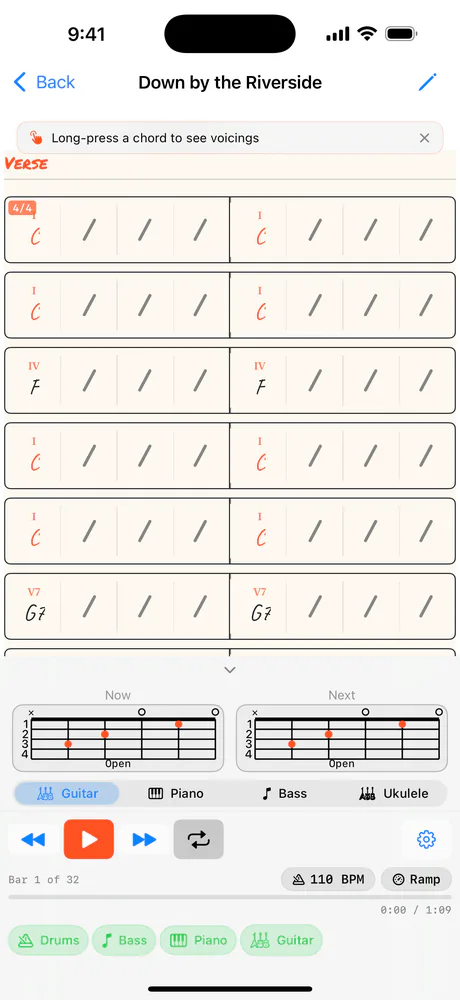
The chart, a backing band, fingering diagrams for this chord and the next, and a mixer. Tap a bar to jump there.
Tap Play on a song page to open the player (on the Mac, double-click the song). The chart is on top and the controls are underneath; the small chevron between them hides the controls so the chart gets the whole screen.
Bars
Tap a bar to jump there. Long-press a chord for its voicings.
Function
Roman numerals for the key. The home chord is in flame.
Now and Next
This chord and the next, on guitar, piano, bass or ukulele.
Transport
Previous bar, play, next bar, loop.
Practice
A-B loop, Tempo Ramp and the metronome.
Tempo
Tap to change it. Ramp steps it as the loop comes round.
Mixer
Drums, Bass, Piano, Guitar. Tap to mute.
The bar that's playing lights up in flame. Tap any bar to jump there, playing or not. Press and hold a chord to pick another voicing for it (right-click on the Mac); see Fingering diagrams.
Small Roman numerals over the chords show what each one does in the song's key: I, ii7, V7 and so on. Chords on the key's root are written in flame, so home is easy to spot. The KEY and STYLE chips sit above the chart.
Previous bar, play and pause, next bar, and the loop button. Under them: which bar you're on, the BPM chip, Ramp, and the time through the song. The gear at the right opens the practice tools.
Tap the BPM chip to change the tempo: −10, −5, +5, +10, or drag the slider anywhere from 40 to 300. The chip turns flame while you're away from the song's own tempo, and Reset takes you back to it. The pitch never changes with the tempo.
Drums, bass, piano and guitar play along, all from a General MIDI SoundFont bundled with the app (GeneralUser GS Lite): a kick, snare and hi-hat backbeat, the bass on the root of the chord on every beat, and piano and steel-string guitar holding the chord. Tap Drums, Bass, Piano or Guitar in the mixer to mute one; it turns grey and its name is struck through.
Related
- Practice toolsLoop a few bars, let Tempo Ramp walk the tempo up as the loop comes round, or practise against a plain click.
- Fingering diagramsGuitar, piano, bass and ukulele shapes for the chord you're on and the one coming next. Pick the voicing you play.
- Repeats, endings and the road mapRepeat a section, add 1st and 2nd endings, mark D.S., D.C., Coda and Fine, and the player follows the way you'd read it.
Still stuck? Write to zhi@nonoaudio.com. Support page