
Room RT60
How long a room takes to go quiet, per octave band, measured with interrupted pink noise.
RT60 is the time it takes a sound to fade by 60 dB once it stops: the number behind "this room is echoey" or "this room is dead". SoundMess Lab measures it per octave band by filling the room with pink noise, cutting it off, and listening to the decay.
Open it with the hourglass in the top row. It is part of Pro. The workbench pauses while RT60 is open, because both need the microphone.
Check the mode card. It reads
External speakerwith63 Hz–8 kHz (8 bands), oriPhone speaker onlywith500 Hz–4 kHz (4 bands), depending on where sound is going right now.Set the scene. Put the phone down where you want to measure, keep the room quiet, and don't move the phone while it measures.
Tap
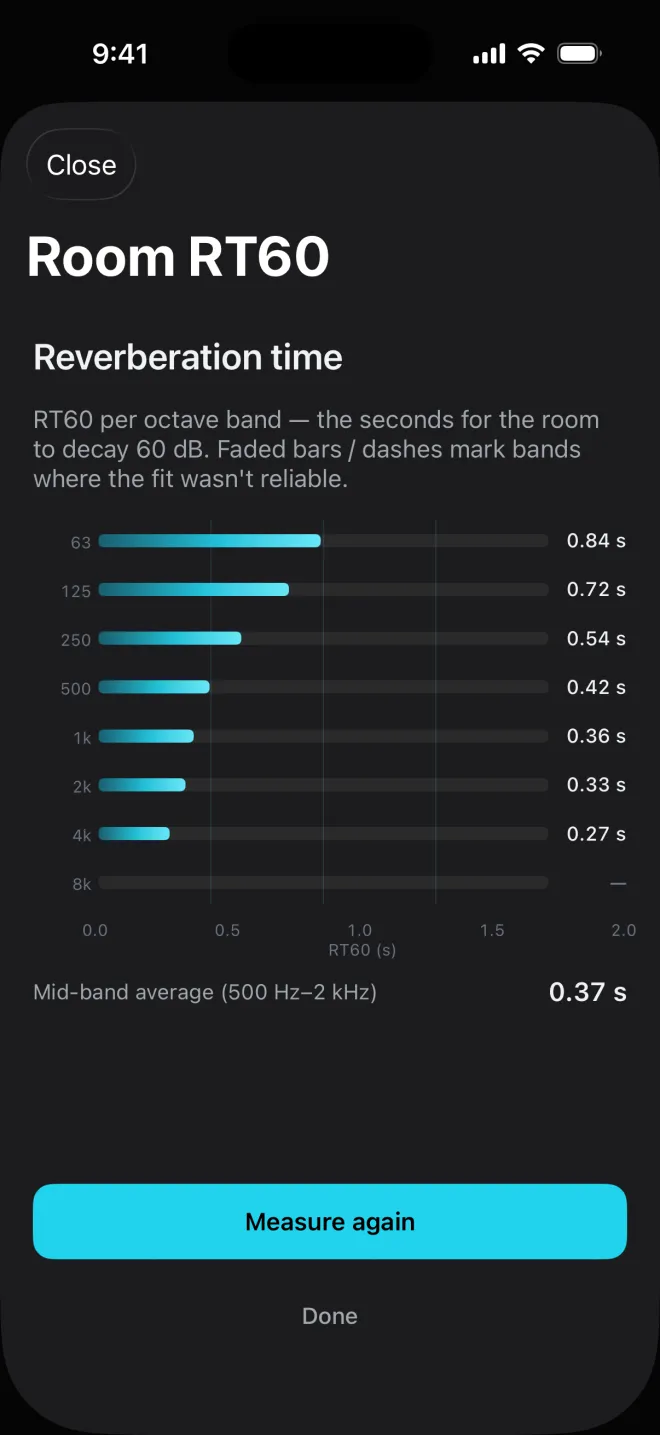
Start. SoundMess Lab plays pink noise for 5 seconds so the room reaches a steady state (Filling the room with pink noise…), then stops it and listens to the decay for 3 to 4 seconds (Measuring decay…).Read the result. One bar per band with its time in seconds, and a
Mid-band average (500 Hz–2 kHz)underneath.Measure againrepeats it.
A phone's built-in speaker can't push enough level outside the mid range for a decay to rise clearly above the room's own noise. Rather than return a row of guesses, SoundMess Lab measures only the four bands it can drive cleanly, 500 Hz to 4 kHz, and plays the noise louder. For the full 63 Hz – 8 kHz set, connect a Bluetooth speaker, a wired speaker or AirPlay: headphones, Bluetooth, AirPlay, USB audio, line out, car audio and HDMI all count as external.
If the mode is wrong (headphones paired but not in use, for example), use Force mode on the first screen: Auto-detect, External or Built-in.
Each band's decay is fitted with a straight line between 5 and 25 dB below where the noise stopped, the T20 method from ISO 3382-2, and stretched to 60 dB. A band is reliable when the line fits the decay well and the end of the fit stays at least 10 dB above the room's noise floor. Faded bars and dashes mark bands where the fit wasn't reliable; the mid-band average only uses reliable bands.
Couldn't fit any bands means the microphone didn't hear enough decay above the noise. Try one or more of:
- Play through an external speaker at a louder volume.
- Move closer to reflective surfaces, or into a more reverberant room.
- Cut ambient noise during capture: even fans or air conditioning drown short decays.
Related
- Signal generatorSine, pink noise, white noise and a sweep, for testing speakers, rooms and your own ears.
- How far to trust itPhone microphones are good in the middle and unreliable at the ends. SoundMess Lab shows you which is which.
- QuestionsAccuracy, Pro, recordings and privacy, and what to check when something isn't working.
Still stuck? Write to zhi@nonoaudio.com. Support page